Chunks and speed ramps
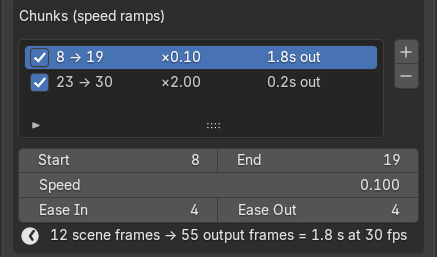
A chunk is a range of scene frames with its own speed. Everything outside your chunks renders at normal speed, one output frame per scene frame.
| Field | What it does | Default |
|---|---|---|
| Enabled (checkbox) | Includes the chunk in the render | On |
| Start / End | First and last scene frame of the chunk | 1 / 10 |
| Speed | 0.5 = half speed (2x the frames), 0.1 = 10x slow motion, 2.0 = 2x fast forward. Allowed range 0.001 to 10. | 0.5 |
| Ease In | Scene frames spent ramping from normal speed into the chunk’s speed; 0 = hard cut | 5 |
| Ease Out | Scene frames spent ramping back to normal speed; 0 = hard cut | 5 |
Ramps follow a smooth S-curve, and where the two ramps overlap, the one closer to normal speed wins. A chunk shorter than Ease In plus Ease Out therefore never reaches its full speed, and TimeShift warns you.
- Adding: + creates a chunk right after the last one (the first chunk starts at the current frame). It runs 10 frames and copies the last chunk’s speed and eases.
- Reading the list: each row shows the range, the speed and how many seconds of output it makes. Under the active chunk, a line spells it out: N scene frames → M output frames = S s at F fps.
- Length: inside a chunk, output frames are roughly scene frames divided by speed, so 20 frames at 0.1 make about 200. The footer shows the total for the whole range; a render is capped at 500,000 output frames.
- Overlaps: when two chunks overlap, the one that starts earlier wins, and TimeShift warns. A chunk outside the render range has no effect.